

While ordering a new Quikclicks Web Hosting account you can transfer your existing Domain Name from another Registrar for use with the new hosting account. The steps below outline the order process:
Step 1: Select the second option ‘I want to transfer my domain to Quikclicks’
2. Type in your domain name EG: ‘quikclicks’
3. Select your domain suffix from the drop-down list EG: ‘.com.au’
4. Click the ‘Click to Continue’ button

Step 5: Click the ‘click to continue’ button again
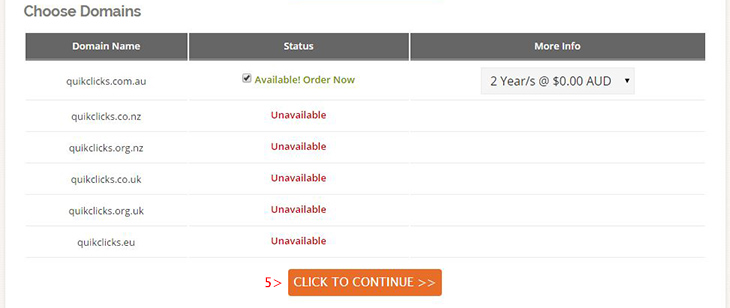
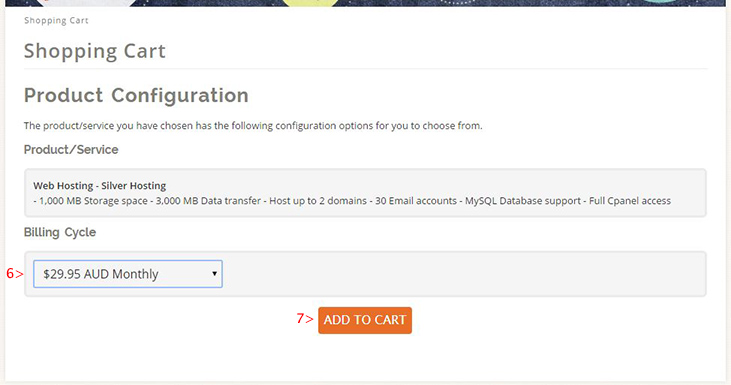
Step 6: Select your desired billing frequency period
Step 7: Click the ‘Add to cart’ button
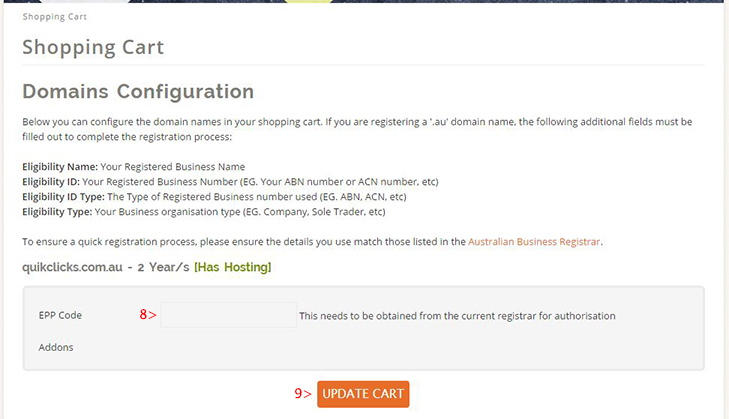
Step 8: Enter you Domain Transfer EPP Code. This is the Domain Name password that allows a transfer to initiate. You can obtain your EPP Code by logging into your Domain Management admin area at your existing Domain Name provider. If you domain has a .com.au or .net.au suffix, you can get the password emailed to the owner by using the following online tool http://admin.auda.org.au/password_recovery/blank_recover_password.faces
Step 9: Click the ‘Update Cart’ button to continue
Step 10: Click the ‘Checkout’ button to continue, then follow the rest of the checkout process, entering your account/payment details to complete the order. Once the order processes you will receive an Email with a confirmation link to confirm you would like the Domain Transfer to commence.